Accept payments wherever you work
Take cards wherever the job is, with tap to pay on a phone or a mobile card reader paired with it, for businesses that work in the field, at client sites, or on the road. Priced on interchange-plus.
Short answer
Mobile payment processing lets you take card payments away from a counter: with tap to pay on a phone, or with a small card reader paired to it that also reads chip cards. Clearo supplies both from authorized partners such as Clover and Helcim, on interchange-plus pricing, with no long-term contract and a dedicated rep.
How mobile payment processing works
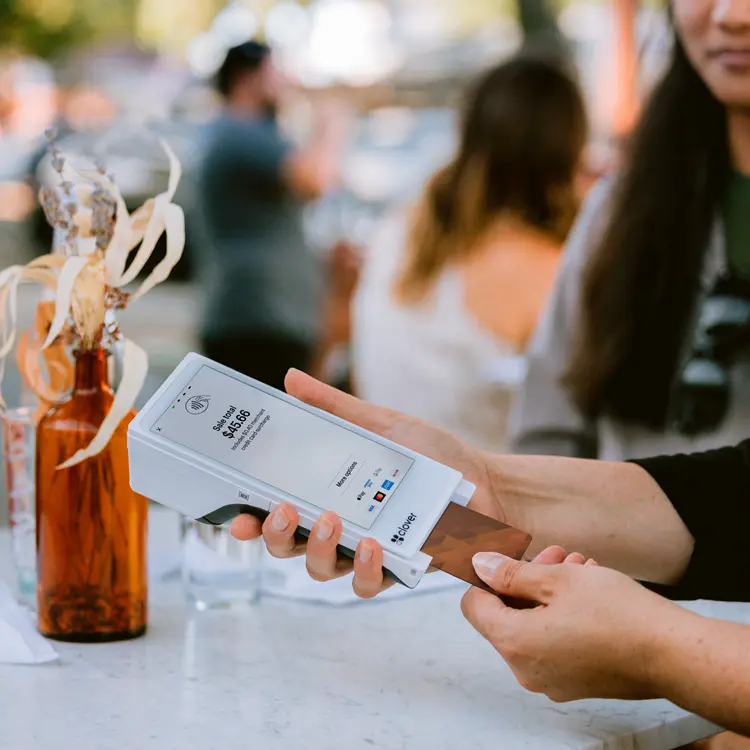
Clearo is an authorized reseller with no terminals of its own, so the mobile card readers and tap to pay apps it supplies come from partners such as Clover and Helcim. You either pair a small reader with your phone, or take contactless cards and phone wallets on the phone itself.
A paired reader takes chip and tap. Tap to pay on the phone takes contactless cards and wallets. Clover, for example, describes Clover Go as its mobile card reader for phones, and offers Tap to Pay on iPhone through the Clover Go app, which it announced in 2023 for US small businesses. Both options run on interchange-plus pricing.
Tap to pay or a card reader: which do you need?
Tap to pay is enough when nearly every customer taps and you sell now and then. Add a reader when some customers need to insert a chip card, or when the phone becomes your main checkout.
Tap to pay works through a provider's app on a phone with NFC. Visa describes merchants taking contactless payments on the NFC-enabled Android and Apple phones they already own, after downloading an app (Visa). For Tap to Pay on iPhone, Apple lists an iPhone XS or later (Apple), and it says more than two thirds of US credit and debit cards are issued contactless-enabled (Apple). The rest need a chip slot, and a phone doesn't have one.
| Tap to pay on a phone | Reader paired with a phone | Portable terminal | |
|---|---|---|---|
| Hardware to carry | None beyond the phone | A small reader | A dedicated device |
| Taps and phone wallets | Yes | Yes | Yes |
| Chip cards inserted | No | Yes | Yes |
| Fits | Occasional sales, and a backup | One person working in the field | Crews, deliveries and pay-at-table |
Debit works on a phone in Canada too: Interac says Canadian businesses can accept Interac Debit contactless payments directly on a smartphone using Tap to Pay on iPhone (Interac). Our guide to Interac Flash covers the tap limits, and our guides to Tap to Pay on iPhone and the mobile credit card reader go into each option.
What does mobile payment processing cost?
The same parts as any card sale: interchange set by the card networks, network fees, and your provider's markup. What changes the bill on the road is how you take the card. A chip read or a tap is a card-present sale. A card number typed in later, because the reader's battery died or it stayed in the truck, is card-not-present, and it costs more.
On Visa's US schedule, as we checked it in October 2026, a Traditional Rewards consumer credit card carries 1.65% + $0.10 when it's dipped or tapped and 2.04% + $0.10 when it isn't present (Visa). Say a mobile groomer takes $8,000 a month on those cards. Keyed instead of tapped, interchange runs 0.39 percentage points higher: $31.20 a month, or $374.40 a year, before any markup.
Then there's the hardware. Buy readers outright where you can: the FTC's business blog describes owners who signed leases costing thousands of dollars for card equipment priced at a few hundred to buy (FTC). Multiply any monthly payment by its term before you sign.
How the markup is packaged matters as much as the device. A flat rate hides interchange inside one rate; interchange-plus pricing shows it, and depending on your volume and card mix it can cost less. A free statement review shows how much of your volume was keyed instead of tapped, and what that cost you.
Is it safe to take cards on a phone?
Yes, when the card is tapped or inserted. EMVCo says a one-time security code is generated for every contactless transaction (EMVCo), so card data copied at the point of sale is far less useful to a thief.
For Tap to Pay on iPhone, Apple says it doesn't store card numbers or PINs on its servers (Apple), and its platform security guide says the feature is validated against the PCI MPoC standard on iOS 18.4 and later (Apple). MPoC is PCI SSC's standard for accepting PINs and contactless payments on phones and other off-the-shelf devices (PCI SSC).
The risks are mostly habits: a payment phone with no passcode, one login shared by a whole crew, a card number written on a job ticket. Keying a card at the door is the expensive one. It gives up the chip's protection, and under Visa's liability shift, counterfeit fraud falls on the party that hasn't implemented chip technology (Visa).
No signal is the other risk. Some devices can hold a payment and send it later, which Visa calls deferred authorization, and Visa says it has to be flagged and obtained within 24 hours of the transaction date for most merchant category codes (Visa). Nothing is approved until then. Our store and forward guide covers the limits worth setting, and our guide on whether tap to pay is safer compares tap, chip and swipe.
How to choose a mobile payment setup
- One person in the field: a reader paired with a work phone, with tap to pay on the same phone as the backup.
- A crew: one device per person and a separate login for each, so payments never live on someone's personal phone.
- Check the phone before the plan. Tap to Pay on iPhone needs an iPhone XS or later, and for Android each provider decides which phones its app supports.
- Test where you sell: the far end of the patio, the basement job, the back row of the market.
- Buy hardware outright where you can, and read any lease before you sign.
- Decide in advance whether offline payments are switched on, and how much you're willing to risk on them.
Clearo supplies tap to pay and mobile card readers from partners such as Clover and Helcim, priced on interchange-plus with no long-term contract and no cancellation fees. Your dedicated rep can tell you which devices fit your phones and your country. If your crews also send invoices or take deposits by phone, pair the mobile setup with our virtual terminal; for taking cards at a counter, see the POS terminals we supply.
Built for mobile businesses
Home service contractors, mobile veterinarians, photographers, event vendors, food trucks, delivery services, personal trainers: if you go to the customer instead of the other way around, mobile processing means you get paid on the spot.
You collect before you leave, instead of sending an invoice and waiting for a check.
Mobile payments FAQ
A partner's. Clearo is an authorized reseller with no terminals of its own, so the tap to pay apps and mobile card readers it supplies come from partners such as Clover and Helcim. Your dedicated rep will match one to your phone and the way you work.
Usually more. A typed card number is a card-not-present sale, and Visa's US schedule sets higher interchange for those: for a Traditional Rewards credit card, 2.04% + $0.10, against 1.65% + $0.10 when the card is dipped or tapped. Keep the reader charged so keying stays the exception.
Without a connection, a tap or chip read can't be approved on the spot. Some devices can store the payment and send it later, which Visa calls deferred authorization, and Visa says it must be obtained within 24 hours of the transaction date for most merchant category codes. A decline that comes back later is your loss, so set limits before you rely on it.
Yes, with the right app. Interac says Canadian businesses can accept Interac Debit contactless payments directly on a smartphone using Tap to Pay on iPhone. Ask your rep which partner app supports it for your account.
Sources
The Apple, Visa, Interac, EMVCo, PCI SSC, FTC and Clover pages behind the facts on this page, checked in October 2026. Device requirements and interchange rates change, so confirm current details with each source.
- Clover Go: Mobile Credit Card Reader for Phone (clover.com)
- Tap to Pay on iPhone and Clover Go App (clover.com)
- Small businesses can accept more mobile payments via Clover with addition of Tap to Pay on iPhone (Clover Blog) (blog.clover.com)
- Visa Tap To Phone (Visa) (visa.com)
- Tap to Pay on iPhone (Apple) (apple.com)
- Tap to Pay on iPhone - Apple Developer (developer.apple.com)
- How Interac Debit helps your small business in the busiest times (Interac) (interac.ca)
- Visa USA Interchange Reimbursement Fees (rates effective April 18, 2026) (usa.visa.com)
- Credit card processing "deals" may be scams (Federal Trade Commission) (ftc.gov)
- EMV Contactless Chip (EMVCo) (emvco.com)
- Tap to Pay on iPhone - Apple Platform Security (support.apple.com)
- Mobile Payments on COTS (MPoC) - PCI Security Standards Council (pcisecuritystandards.org)
- Visa to Help Accelerate EMV Chip Migration and Support Merchants (usa.visa.com)
- Deferred Authorization Indicator Reminder (Visa) (usa.visa.com)
See how we compare
Side-by-side comparisons that link each company's own pricing page.
Ready to lower your processing costs?
See exactly what you're paying and how much you could save, with no commitment required.
Related Services
Everything you need to accept payments and reduce costs.
Payment Processing
Transparent interchange-plus pricing
Merchant Services
Full merchant services stack for small business
Credit Card Processing Fees
Understand fees and lower your effective rate
POS Terminals
Countertop, wireless, and portable terminals
Online Payments
Secure website checkout and payment gateway
Virtual Terminal
Phone and remote payment processing
ACH Payment Processing
Bank-to-bank payments for invoices and B2B
Chargeback Management
Tools and a rep to keep disputes in check
PCI Compliance
Support for keeping card data secure
Surcharging Program
Pass processing costs to credit card users
Pricing
See our interchange-plus rates and how we compare
Other industries we serve
Clearo works with businesses across the US and Canada. Find your industry below.
Guides to taking payments on a phone
Hardware and POS
Tap to Pay on iPhone: how it works for small businesses
Hardware and POS
Card reader for iPhone: when you need one and what to buy
Hardware and POS
Apple Pay for business: how to accept it and what it costs
Hardware and POS
Mobile credit card reader: how to choose the right one
Online payments
QR code payments for merchants: how they work and the risks
Hardware and POS
How to accept credit card payments on your phone or by phone
Hardware and POS
Google Pay for business: in-store, online, and in-app setup
Let's talk about your payments
Tell us a bit about your business and how you currently take payments. A Clearo rep will reach out within one business day with a personalized recommendation. No generic pitch, no pressure.
If we can save you money and improve your setup, we'll show you exactly how. If we can't, we'll tell you that too.
Ready to save on processing?
Fill out a quick form and a Clearo rep will reach out within one business day with a personalized recommendation.
Get Your Free ConsultationNo obligation. No pressure. Takes 2 minutes.