POS Terminals
POS terminals for the counter, the table and the road
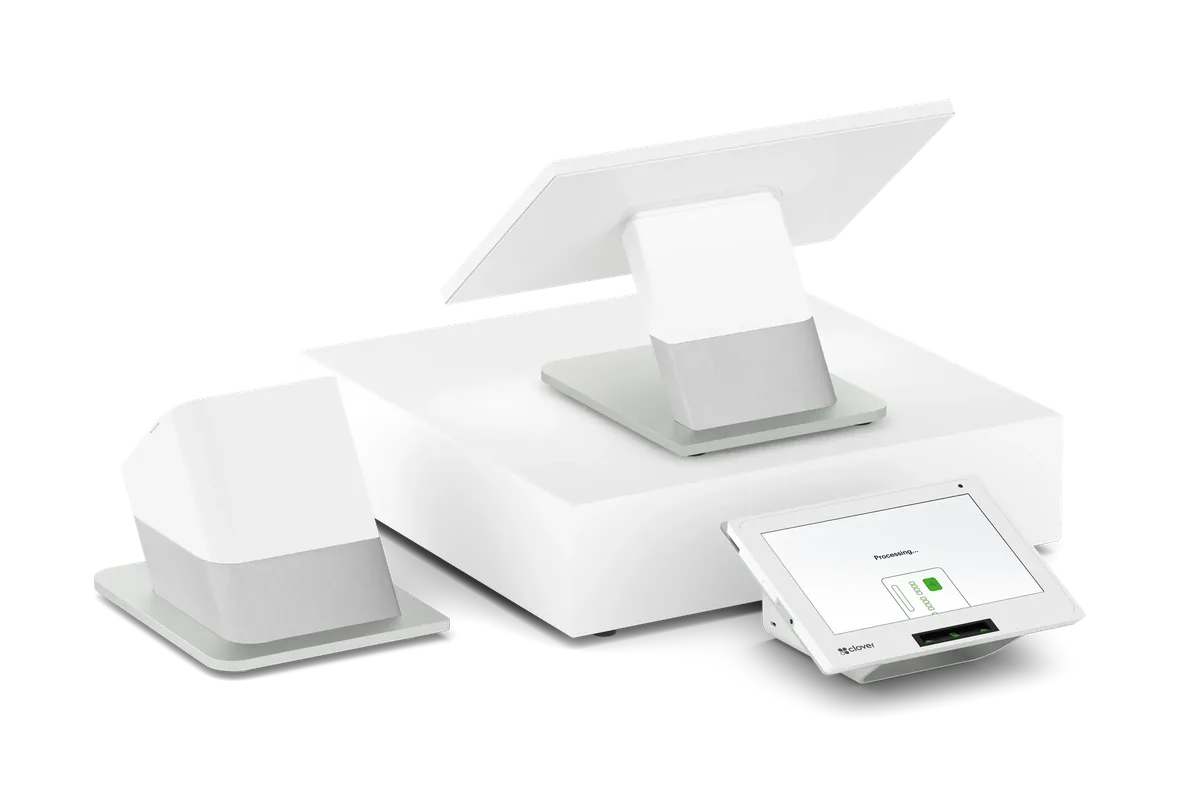
Countertop, wireless, and portable terminals from authorized partners such as Clover and Helcim. They read chip, tap, and swipe, take Interac, Visa, Mastercard, Apple Pay, and Google Pay, and run on interchange-plus pricing.
Short answer
A POS terminal is the device that reads your customer's card at checkout. Countertop models stay at the register, wireless ones move around your space, and portable ones go out on the road. Clearo supplies all three from authorized partners such as Clover and Helcim; they read chip, tap and swipe and run on interchange-plus pricing.
What is a POS terminal, and which type do you need?
A POS terminal is the card machine at the point of sale: it reads the card, sends the payment for approval and prints or texts the receipt. The type you need depends on where your customers pay.
Countertop terminals
For a fixed checkout counter in a shop, restaurant, or medical office. Reads chip, tap, and swipe.
Wireless terminals
Move around your space: hand the terminal to a customer at their table, take it to a fitting room, or take payment at the door.
Portable terminals
For delivery drivers, market vendors and anyone else who takes payment away from the shop. Ask your rep which models connect the way your route needs.
| Terminal type | Where it works | Good fit for |
|---|---|---|
| Countertop | Stays at a fixed checkout counter, wired or on Wi-Fi | Shops, restaurant hosts and front desks, medical offices |
| Wireless | Moves around your premises on your network | Table-side payment, fitting rooms, payment at the door |
| Portable | Goes off site with the person taking payment | Deliveries, markets, field service visits |
Comparing processors as well as hardware? Our guide to the best credit card processing for small business sets seven side by side. For phone orders with no card in hand, a virtual terminal does the job instead.
What equipment do you need for a POS terminal?
Three things: the terminal, a connection (Wi-Fi, a network cable or cellular, depending on the model), and a merchant account that settles the sales to your bank. A receipt printer, cash drawer or POS software come on top only if your checkout needs them. Here is what the terminals we supply cover:
Why chip and tap matter at the counter
Every chip read produces a one-time security code, according to EMVCo, the body behind the chip standard (EMVCo), which is why copied card data is far less useful to a counterfeiter. Visa's liability shift adds a money reason: since October 1, 2015, a counterfeit fraud loss lands on the side that hadn't implemented chip technology (Visa).
So dip or tap whenever the card allows it, and keep swiping for cards that can't be read any other way. Our guides to credit card machines for small business and what a POS system costs go further on choosing hardware.
How do you set up a POS terminal?
- Open the merchant account first, since the terminal is tied to it. Your sales and category code set how your interchange is priced.
- Pick the type from the table above for each place you take payment, and count the units you need.
- Connect it: plug in power and a network cable, join your Wi-Fi, or activate cellular service on a portable model.
- Run a small live sale and a refund, then check that both show up correctly on your next deposit.
- Show staff how to dip or tap first and when a swipe is the fallback.
Clearo says setup takes under 48 hours, and your dedicated rep works through these steps with you.
Already have POS terminals?
Tell your rep what you use now and how you sell. Clearo has no terminals of its own: as an authorized reseller, it supplies terminals from partners such as Clover and Helcim, and your rep will recommend models that fit. Already on Clover? Our guide to Clover processing fees compares Clover's own plans with Clover hardware on a Clearo quote. Before you replace anything, check what you still owe on your current equipment. The FTC has cautioned that some businesses ended up paying thousands of dollars to lease card machines they could have bought for a few hundred (FTC). The terminals we supply suit restaurants, retail shops, and field teams using mobile payments, and every account runs on interchange-plus pricing.
POS terminal FAQ
The terminal reads the card by chip, tap or swipe and sends the sale to your processor, which passes it over the card network to the bank that issued the card. That bank approves or declines it within seconds, and approved sales settle to your bank account when the day's batch closes.
Yes. The terminal only captures the payment; a merchant account with a processor is what moves the money to your bank. Clearo sets up the merchant account and supplies the terminal together, from partners such as Clover and Helcim.
Read any lease closely before you sign. The FTC has warned that some businesses paid thousands of dollars over a lease for card machines they could have bought for a few hundred, so compare the total lease cost with the purchase price and check whether the lease can be canceled.
The terminals Clearo supplies take contactless payments, including Apple Pay and Google Pay, along with chip and swipe cards and Interac, Visa and Mastercard.
Sources
The EMVCo, Visa and FTC pages behind the facts on this page, checked in October and November 2026.
See how we compare
Side-by-side comparisons that link each company's own pricing page.
Find out what you pay to take cards
We'll break down your current statement and show whether interchange-plus could cost less at your volume and card mix. The review is free, and you're under no obligation to move.
Related Services
What else we can set up for your business.
Payment Processing
Interchange-plus pricing for card payments
Merchant Services
Merchant accounts and services for small businesses
Credit Card Processing Fees
What each fee is and what drives your effective rate
Online Payments
Hosted checkout and gateway integration for your website
Mobile Payments
Accept payments from phone or tablet
Virtual Terminal
Phone and remote payment processing
ACH Payment Processing
Bank-to-bank payments for invoices and B2B
Chargeback Management
Tools and a rep to keep disputes in check
PCI Compliance
Support for keeping card data secure
Surcharging Program
Pass processing costs to credit card users
Pricing
How interchange-plus pricing works, and how we compare
Other industries we serve
Clearo works with businesses across the US and Canada. Find your industry below.
Guides to POS systems and in-person payments
Hardware and POS
What is a POS system? How it works and how to choose
Hardware and POS
Retail POS system: how to choose one for your store
Hardware and POS
NFC payment: how tap to pay works and what you need
Hardware and POS
Choosing credit card processing machines for small business
Canada
Debit machine for small business: a Canadian buying guide
Hardware and POS
POS system for restaurants: a guide for US owners
Hardware and POS
Bar POS system: tabs, tips, and what to look for
Fees and pricing
Clover processing fees in 2026: rates, plans, a worked month
Hardware and POS
Food truck POS system: what to look for before you buy
Hardware and POS
How much does a POS system cost in 2026?
Canada
POS system in Canada: how to choose the right one
Canada
What is Interac? A merchant's guide to debit in Canada
Hardware and POS
Store and forward: taking card payments offline
Canada
Interac Flash: how contactless debit works for merchants
Canada
Restaurant POS in Canada: what to check before you sign
Payment basics
Split tender: one sale, two or more ways to pay
Hardware and POS
Cash register vs POS system: differences and when to switch
Canada
Tap to pay in Canada: limits and costs for merchants
Free Consultation
Let's talk about your payments
Tell us about your business and how you take payments now. A Clearo rep will get back to you within one business day with a recommendation for your setup.
If we can save you money and improve your setup, we'll show you exactly how. If we can't, we'll tell you that too.
See what you're really paying
Fill out a quick form and a Clearo rep will reach out within one business day with a personalized recommendation.
Get Your Free ConsultationNo obligation, and the form takes about 2 minutes.